Touch Typing Cheat Sheet

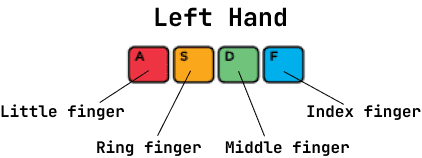
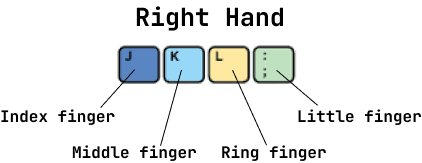
Starting Positions
Tips
F and J Indication
There are small little markers on keys F and J. Every keyboard will have it. The purpose of having those markers is to place your hands on them without looking at keyboard.
Don't Look!
An important aspect is not to look at the keyboard while typing. This helps in registering key positions in your subconscious mind.
Practice Is the Key
In learning to type, it all boils down to three points:
- - Practice
- - Practice some more
- - And then practice some more
Use all fingers
Practice using all of your fingers and all of the keys.
Set a typing goal
For instance, you might currently type at 30wpm but you wish to reach ~60wpm. Keep accuracy goals in mind as you progress.